Draws a barcode symbol on the specified canvas. The barcode symbol is specified in the properties of this barcode component.
function DrawTo(Canvas: TCanvas; Left, Top: Integer; Module: Integer = 0; Height: Integer = 0; Angle: Integer = -1; HDPI: Integer = 0; VDPI: Integer = 0): Integer; overload; virtual;
On the specified canvas, draws current barcode symbol that is specified in the properties of this barcode component.
Canvas: TCanvas; Specifies target canvas to represent the barcode symbol in it.
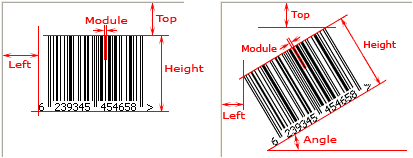
Left: Integer; Specifies the margin between the barcode symbol and the left side of the canvas in logical dots or pixels in the horizontal direction. If the human readable text is represented, it's included in the barcode symbol.
For TBarcode1D_UPCA, TBarcode1D_UPCE, TBarcode1D_UPCE0, TBarcode1D_UPCE1, TBarcode1D_EAN2, TBarcode1D_EAN5, TBarcode1D_EAN8, and TBarcode1D_EAN13 barcode components, if the human readable text is represented, and the TextAlignment property is set to taCustom, the left and right quiet zones marks and their horizontal spacing are included in the barcode symbol too.
For TBarcode1D_ITF6, TBarcode1D_ITF14, and TBarcode1D_ITF16 barcode components, all bearer bars, the left and right spacing are included in the barcode symbol too.
If the human readable text is represented and it exceeds the barcode symbol in horizontal or vertical direction, the excess is included in the barcode symbol too.
See also the "LeftMargin" property.
Top: Integer; Specifies the margin between the barcode symbol and the top side of the canvas in logical dots or pixels in the vertical direction. If the human readable text is represented, it's included in the barcode symbol.
For TBarcode1D_UPCA, TBarcode1D_UPCE, TBarcode1D_UPCE0, TBarcode1D_UPCE1, TBarcode1D_EAN2, TBarcode1D_EAN5, TBarcode1D_EAN8, and TBarcode1D_EAN13 barcode components, if the human readable text is represented, and the TextAlignment property is set to taCustom, the left and right quiet zones marks and their horizontal spacing are included in the barcode symbol too.
For TBarcode1D_ITF6, TBarcode1D_ITF14, and TBarcode1D_ITF16 barcode components, all bearer bars, the left and right spacing are included in the barcode symbol too.
If the human readable text is represented and it exceeds the barcode symbol in horizontal or vertical direction, the excess is included in the barcode symbol too.
See also the "TopMargin" property.
Module: Integer; Specifies the module width in logical dots or pixels in the horizontal direction, it is the width of the smallest bar (or space) in the barcode symbol. If the parameter isn't provided or it is set to zero, the value of "Module" property will be used.
See also the "Module" property.
Height: Integer; Specifies the distance between the top and bottom of a barcode symbol in modules. If the human readable text is displayed, the height of the human readable text and its vertical spacing (TextVSpacing) are included.
If the parameter isn't provided or its value is set to zero, the value of Height property will be used.
For TBarcode1D_ITF6, TBarcode1D_ITF14, and TBarcode1D_ITF16 barcode components, the height of the top and bottom bearer bars (BearerWidth) are included too.
If the human readable text is displayed, and it exceeds the barcode symbol in vertical direction, the excess isn't included.
See also the "Height" property.
Note: If the parameter is less than zero, its absolute value specifies the height in logical dots or pixels in the vertical direction.
Angle: Integer; Specifies an angle in degrees to rotate the barcode symbol. It defaults to -1 if the Angle is not provided, and the barcode symbol will be rotated base on the value of the Orientation property:
If you want to use the -1 degrees, the 359 degrees can be used instead.
HDPI: Integer, Specifies the horizontal resolution of canvas in logical DPI. It's the number of logical dots or pixels per inch.
It defaults to 0 if the HDPI is not provided. If it is set to less than or equal to zero, the physical horizontal resolution obtained from the Canvas parameter will be used. So if you use the MM_TEXT map mode, you can specify it to 0. If you use the MM_ISOTROPIC or MM_ANISOTROPIC map mode, and the horizontal units or scaling is changed, the parameter is required in order to represent the correct barcode symbol when the symbol is rotated.
VDPI: Integer, Specifies the vertical resolution of canvas in logical DPI. It's the number of logical dots or pixels per inch.
It defaults to 0 if the VDPI is not provided. If it is set to less than or equal to zero, the physical vertical resolution obtained from the Canvas parameter will be used. So if you use the MM_TEXT map mode, you can specify it to 0. If you use the MM_ISOTROPIC or MM_ANISOTROPIC map mode, and the vertical units or scaling is changed, the parameter is required in order to represent the correct barcode symbol when the symbol is rotated.
See diagram:
For Delphi 3, the method overload and default value of parameter aren't supported, so the method name is changed to DrawTo1, and the parameters Module, Height, Angle, HDPI, and VDPI are required.
The method uses GetDeviceCaps function to retrieves device-specific information for the specified device. When using Printer.Canvas as the target cvanvas, it will fail if a default printer is not set in Windows. Please ensure that a default printer is specified in Windows:
Set default printer for current application:
uses Winapi.Printers;
procedure SetAppPrinter(const PrinterName: string);
var
Idx: Integer;
begin
Idx := Printer.Printers.IndexOf(PrinterName);
if Idx <> -1 then
Printer.PrinterIndex := Idx
else
ShowMessage('Printer not found!');
end;
Set the global default printer.
uses Winapi.WinSpool;
procedure SetWindowsDefaultPrinter(const PrinterName: string);
begin
if SetDefaultPrinter(PChar(PrinterName)) then
SendMessage(HWND_BROADCAST, WM_SETTINGCHANGE, 0, 0)
else
RaiseLastOSError;
end;